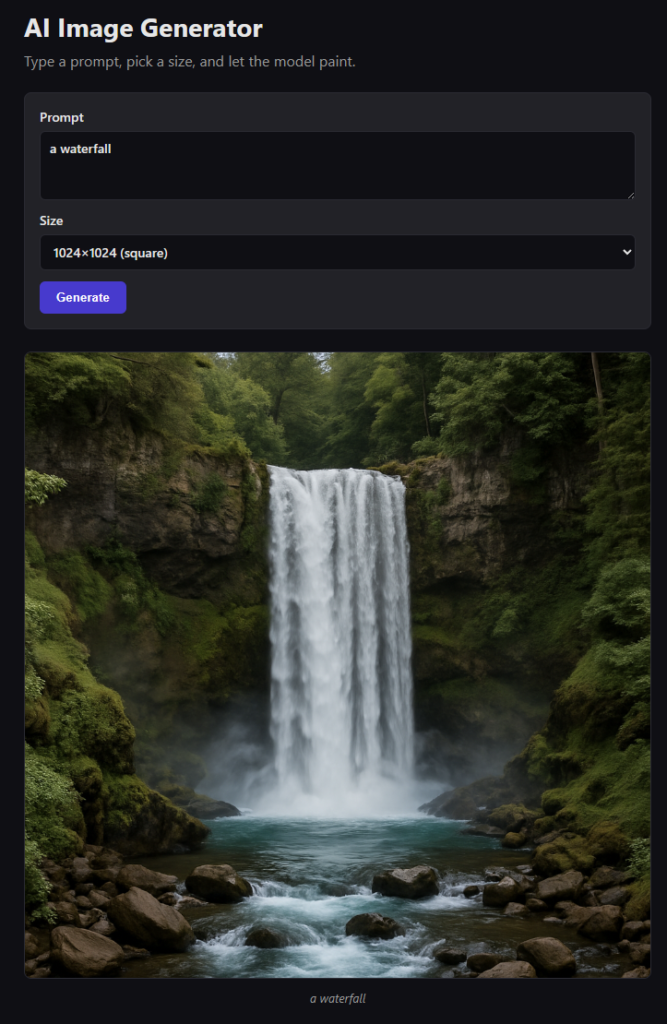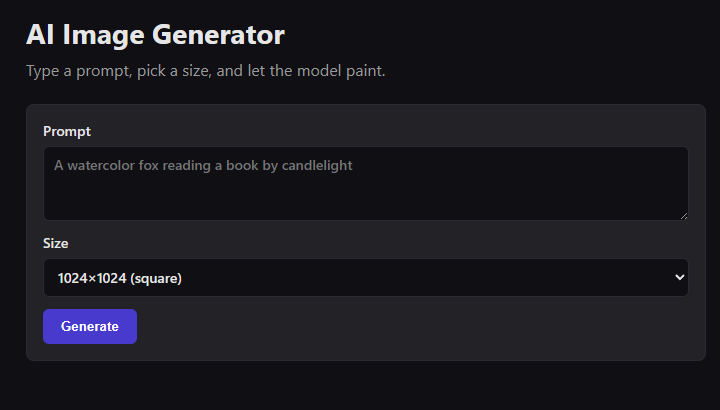
We’ve been talking about wiring LLMs into C# — Semantic Kernel, Microsoft.Extensions.AI, tool calling. Time to switch modalities. This post walks through a small but complete Blazor Web App on .NET 10 that takes a user prompt, hits OpenAI’s image generation endpoint, and shows the result in the browser. No JavaScript, no separate API tier, no auth ceremony.
By the end you’ll have a page you can host anywhere Blazor runs, a service class you can lift into any other .NET app, and a clear picture of where the security boundary sits.
Why Blazor for this?
A generative-image feature is a good stress test for a front-end stack because it exercises three things at once: a form with validation, a long-running server call, and rendering binary content the model just produced. Blazor Web App with the InteractiveServer render mode gives you all three for free:
- Your API key stays on the server — Blazor Server never ships it to the browser.
- The
asyncgeneration call is justawaiting a service method. No fetch calls, no CORS, no JSON serialization boilerplate. - You can render the image via a
data:URL from raw bytes with a single Razor expression.
If you’d rather use Blazor WebAssembly, the same UI code works — but you’d need to move the OpenAI call behind a minimal API endpoint, because you can’t ship the API key to the browser. We’ll stick with Server for this post.
Scaffolding the project
Create the app and add the OpenAI SDK. Make sure your OpenAI account has access to gpt-image-1 — it’s the model we’ll target:
dotnet new blazor -n BlazorImageGen -f net10.0 --interactivity Server
cd BlazorImageGen
dotnet add package OpenAI
The --interactivity Server flag gives you an app pre-wired for interactive server components — exactly what we want. Store your key outside the repo with user-secrets:
dotnet user-secrets init
dotnet user-secrets set "OpenAI:ApiKey" "sk-..."
The generation service
Wrap the OpenAI call in a plain service so the Razor page doesn’t know or care that OpenAI exists. This is the same pattern you’d use for any external dependency in a Blazor app.
using OpenAI.Images;

public class ImageGenerationService
{
    private readonly ImageClient _client;

    public ImageGenerationService(IConfiguration config)
    {
        var apiKey = config["OpenAI:ApiKey"]
            ?? throw new InvalidOperationException("OpenAI:ApiKey not configured");
        _client = new ImageClient(model: "gpt-image-1", apiKey: apiKey);
    }

    public async Task<byte[]> GenerateAsync(string prompt, string size, CancellationToken ct = default)
    {
        // gpt-image-1 does NOT accept response_format (it always returns bytes),
        // and its valid sizes are 1024x1024, 1024x1536, 1536x1024, or auto.
        var options = new ImageGenerationOptions
        {
            Size = ParseSize(size)
        };

        var result = await _client.GenerateImageAsync(prompt, options, ct);
        return result.Value.ImageBytes.ToArray();
    }

    private static GeneratedImageSize ParseSize(string s) => s switch
    {
        "1024x1024" => GeneratedImageSize.W1024xH1024,
        "1024x1536" => new GeneratedImageSize(1024, 1536),
        "1536x1024" => new GeneratedImageSize(1536, 1024),
        _           => GeneratedImageSize.W1024xH1024
    };
}
A few things worth flagging:
- Model choice:
gpt-image-1. OpenAI’s current-generation image model. It always returns bytes — you must not sendresponse_formator the API replies withHTTP 400: Unknown parameter: 'response_format'. If you’d rather use DALL·E 3, swap the model id back to"dall-e-3"and you can addResponseFormatandQualityoptions again. - Sizes are model-specific.
gpt-image-1supports1024x1024,1024x1536,1536x1024, andauto. Only the square variant is available as a static (GeneratedImageSize.W1024xH1024) — for the portrait/landscape sizes you construct the struct directly withnew GeneratedImageSize(width, height). DALL·E 3’s1024x1792/1792x1024will be rejected here. - Bytes over URLs. Bytes are simpler in Blazor — no HTTP proxy, no expiry to worry about, and the client stays inert if the request is cancelled. For
gpt-image-1this is the only option anyway. - Constructor takes
IConfiguration. That way the same service works with user-secrets in development, environment variables in a container, and Azure App Configuration in production, without changing a line.
Register it in Program.cs as a scoped service:
builder.Services.AddScoped<ImageGenerationService>();
The Razor page
The UI has three parts: a form, a button that flips into a loading state, and an <img> that appears when the bytes come back. Everything lives in a single component.
@page "/"
@rendermode InteractiveServer
@inject ImageGenerationService Images

<PageTitle>Image Generator</PageTitle>

<h1>AI Image Generator</h1>

<div class="form">
    <label>
        Prompt
        <textarea @bind="_prompt" rows="3" placeholder="A watercolor fox reading a book by candlelight"></textarea>
    </label>

    <label>
        Size
        <select @bind="_size">
            <option>1024x1024</option>
            <option>1024x1536</option>
            <option>1536x1024</option>
        </select>
    </label>

    <button @onclick="Generate" disabled="@_busy">
        @(_busy ? "Generating…" : "Generate")
    </button>
</div>

@if (_error is not null)
{
    <p class="error">@_error</p>
}

@if (_dataUrl is not null)
{
    <img src="@_dataUrl" alt="Generated image" />
}

@code {
    private string _prompt = "";
    private string _size = "1024x1024";
    private bool _busy;
    private string? _dataUrl;
    private string? _error;

    private async Task Generate()
    {
        if (string.IsNullOrWhiteSpace(_prompt)) return;

        _busy = true;
        _error = null;
        _dataUrl = null;

        try
        {
            var bytes = await Images.GenerateAsync(_prompt, _size);
            _dataUrl = $"data:image/png;base64,{Convert.ToBase64String(bytes)}";
        }
        catch (Exception ex)
        {
            _error = ex.Message;
        }
        finally
        {
            _busy = false;
        }
    }
}
The data: URL trick is the pay-off — no controller, no static file handler, just base64 embedded in the DOM. For 1024×1024 PNGs this is on the order of a few hundred KB, which is fine for a Blazor Server round-trip.
How the request actually flows
When the user clicks Generate:
- The Blazor Server circuit invokes
Generate()on the component instance living on your server. ImageGenerationService.GenerateAsyncserializes the request and hitshttps://api.openai.com/v1/images/generations.- OpenAI returns the raw PNG bytes inside the response payload (because we asked for
ResponseFormat.Bytes). - The component sets
_dataUrl, and Blazor pushes a UI diff down the SignalR connection. - The browser renders the
<img>— the base64 bytes were already delivered as part of the diff.
Notice what didn’t happen: the browser never spoke to OpenAI. The API key never left the server. That’s the entire security benefit of Blazor Server for this workload.
Nice touches you can add next
- Quality control.
gpt-image-1acceptslow,medium,high, orauto. Expose a dropdown and pass it throughImageGenerationOptions.Quality. Higher quality costs more per image. - Streaming progress. The image endpoint doesn’t stream, but you can
await Task.Yield()plus an animated CSS spinner to keep the UI honest. - History. Keep the last N results in a scoped service so the user can flip through them without re-generating.
- Download button. Turn the byte array into a temporary file via
FileStreamResultin a minimal API endpoint, or expose adata:anchor withdownload. - Prompt safety. OpenAI already refuses obvious violations, but you’ll want a light-touch pre-check (max length, banned words) so you fail fast without paying for a rejected call.
- Swap the provider. Azure OpenAI, Stability AI, and self-hosted models all have SDKs with similar shapes. Because your Razor page only knows about
ImageGenerationService, changing providers is a change of one class.
Wrapping up
Blazor Web App on .NET 10 is a boring, competent stack for AI features. You get server-side secrets, an async programming model that matches how these APIs work, and a rendering model that treats “here are some fresh bytes I just made” as a normal state update. Add the OpenAI SDK, register one service, drop in one component, and you have an image generator.
The full working sample is in the companion repo BlazorImageGen — configure your API key with user-secrets and run dotnet run.
Repository
BlazorImageGen