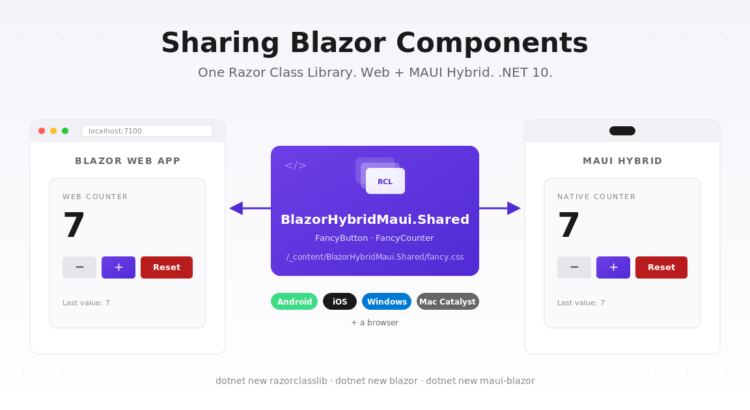
The pitch for Blazor Hybrid is that the same .razor code renders your UI on the web and inside a MAUI app on Android, iOS, Windows, and Mac. That’s only true if you actually put the shared code somewhere both hosts can reach. Copy-pasting components between a web project and a MAUI project is not sharing — it’s two codebases that drift. This post builds it the right way: three projects in one solution, one custom component living in a Razor Class Library, both apps consuming it.
The three-project shape
Here’s the layout we’re aiming for:
BlazorHybridMaui/
├── BlazorHybridMaui.sln
├── BlazorHybridMaui.Shared/   # Razor Class Library — the custom component
│   ├── Components/FancyButton.razor
│   ├── Components/FancyCounter.razor
│   └── wwwroot/fancy.css
├── BlazorHybridMaui.Web/      # Blazor Web App (InteractiveServer)
│   └── Components/Pages/Home.razor   → renders <FancyCounter />
└── BlazorHybridMaui.Maui/     # MAUI Blazor Hybrid app
    └── Components/Pages/Home.razor   → renders the same <FancyCounter />
Two host projects, one library. The host projects contain only what’s unique about running in that host (the ASP.NET pipeline for Web, the MAUI shell for Hybrid). Everything you want on the screen — components, styling, behavior — lives in the shared library.
Scaffolding the solution
mkdir BlazorHybridMaui && cd BlazorHybridMaui

dotnet new sln -n BlazorHybridMaui

dotnet new razorclasslib -n BlazorHybridMaui.Shared -f net10.0
dotnet new blazor        -n BlazorHybridMaui.Web    -f net10.0 --interactivity Server
dotnet new maui-blazor   -n BlazorHybridMaui.Maui   -f net10.0

# Add the projects to the solution
dotnet sln add BlazorHybridMaui.Shared BlazorHybridMaui.Web BlazorHybridMaui.Maui

# Both host apps reference the shared library
dotnet add BlazorHybridMaui.Web  reference BlazorHybridMaui.Shared
dotnet add BlazorHybridMaui.Maui reference BlazorHybridMaui.Shared
That’s the whole plumbing. From this point everything you add to Shared is visible to both hosts.
The shared component
We need a component that’s obviously not trivial — otherwise the whole “sharing” story could be handled by copy-paste. So we build two:
FancyButton— a styled button with parameters (Text,Variant,Disabled,OnClick, and aChildContent).FancyCounter— a counter widget with-/+/Reset, min/max bounds, and anOnChangedcallback. Internally composes threeFancyButtons.
@* BlazorHybridMaui.Shared/Components/FancyButton.razor *@
<button class="fancy-btn fancy-btn-@Variant"
        disabled="@Disabled"
        @onclick="OnClick">
    @if (ChildContent is not null) { @ChildContent } else { @Text }
</button>

@code {
    [Parameter] public string Text { get; set; } = "Click me";
    [Parameter] public string Variant { get; set; } = "primary";  // primary | secondary | danger
    [Parameter] public bool Disabled { get; set; }
    [Parameter] public EventCallback OnClick { get; set; }
    [Parameter] public RenderFragment? ChildContent { get; set; }
}
@* BlazorHybridMaui.Shared/Components/FancyCounter.razor *@
<div class="fancy-counter">
    <div class="fancy-counter-display">
        <span class="fancy-counter-label">@Label</span>
        <span class="fancy-counter-value">@_count</span>
    </div>
    <div class="fancy-counter-actions">
        <FancyButton Text="-"     Variant="secondary" OnClick="Decrement" Disabled="@_isAtMin" />
        <FancyButton Text="+"     Variant="primary"   OnClick="Increment" Disabled="@_isAtMax" />
        <FancyButton Text="Reset" Variant="danger"    OnClick="Reset"     Disabled="@_isAtInitial" />
    </div>
</div>

@code {
    [Parameter] public string Label { get; set; } = "Count";
    [Parameter] public int Initial { get; set; } = 0;
    [Parameter] public int Min { get; set; } = 0;
    [Parameter] public int Max { get; set; } = 100;
    [Parameter] public EventCallback<int> OnChanged { get; set; }

    private int _count;

    // Extract the comparisons to computed properties so the razor markup
    // doesn't need to embed '<' / '>' inside attribute expressions.
    private bool _isAtMin     => _count <= Min;
    private bool _isAtMax     => _count >= Max;
    private bool _isAtInitial => _count == Initial;

    protected override void OnInitialized() => _count = Initial;
    private async Task Increment() { _count++; await OnChanged.InvokeAsync(_count); }
    private async Task Decrement() { _count--; await OnChanged.InvokeAsync(_count); }
    private async Task Reset()     { _count = Initial; await OnChanged.InvokeAsync(_count); }
}
This is normal Blazor — parameters, event callbacks, composition. Nothing about it is aware of who’s hosting it.
Styling: the RCL static assets trick
Any file you drop into a Razor Class Library’s wwwroot/ folder ships as a static web asset. Consumers reach it through a URL scoped to the library’s name:
/_content/BlazorHybridMaui.Shared/fancy.css
So you write your CSS once in BlazorHybridMaui.Shared/wwwroot/fancy.css and both host apps reference the exact same file at that URL. No copying, no bundler configuration. Just a <link> in each host:
<!-- BlazorHybridMaui.Web/Components/App.razor -->
<link rel="stylesheet" href="_content/BlazorHybridMaui.Shared/fancy.css" />

<!-- BlazorHybridMaui.Maui/wwwroot/index.html -->
<link rel="stylesheet" href="_content/BlazorHybridMaui.Shared/fancy.css" />
If you’d rather use per-component scoped CSS (FancyButton.razor.css next to FancyButton.razor), the mechanism works the same way — the bundled file is at /_content/BlazorHybridMaui.Shared/BlazorHybridMaui.Shared.bundle.scp.css. For a small library, a plain shared stylesheet is easier to reason about.
Consuming from the web host
The web host is a stock Blazor Web App with one addition in _Imports.razor:
@using BlazorHybridMaui.Shared.Components
Now any page can drop the tag in. The web home page:
@page "/"
@rendermode InteractiveServer

<h1>Blazor Web App</h1>
<FancyCounter Label="Web counter" OnChanged="OnCountChanged" />

<p class="log">Last value from callback: <strong>@_lastValue</strong></p>

@code {
    private int _lastValue;
    private void OnCountChanged(int value) => _lastValue = value;
}
Consuming from the MAUI host
The MAUI host is a stock maui-blazor template. Add the same @using to its _Imports.razor:
@using BlazorHybridMaui.Shared.Components
And the MAUI home page is now indistinguishable from the web one, apart from the @rendermode directive being unnecessary (in Hybrid, everything is interactive by default):
@page "/"

<h1>MAUI Hybrid Host</h1>
<FancyCounter Label="Native counter" OnChanged="OnCountChanged" />

<p class="log">Last value from callback: <strong>@_lastValue</strong></p>

@code {
    private int _lastValue;
    private void OnCountChanged(int value) => _lastValue = value;
}
Run one, run the other, and the counter looks and behaves identically. When you tweak FancyCounter — say, add a Step parameter — both hosts get the change on the next build.
What each host still owns
Sharing components doesn’t mean the two projects collapse into one. Each host keeps the things unique to running in that environment:
- Web host —
Program.cs, ASP.NET pipeline,App.razorwith the HTML template,appsettings.json, authentication middleware, the whole request/response side. - MAUI host —
MauiProgram.cs,MainPage.xamlhosting theBlazorWebView,Platforms/per-target code, app icon, splash screen, native permissions manifest.
Services split the same way. Anything platform-agnostic (view models, computation, HTTP calls to a third party) can live in the shared library and be registered on both sides. Anything platform-specific (a file picker that uses Microsoft.Maui.Storage.FilePicker on MAUI vs. an <InputFile> element on the web) stays in the respective host or hides behind an interface the host implements.
The BlazorWebView wiring, briefly
The one XAML file in the MAUI project hosts the WebView and points it at the app’s Routes:
<ContentPage xmlns="http://schemas.microsoft.com/dotnet/2021/maui"
             xmlns:x="http://schemas.microsoft.com/winfx/2009/xaml"
             xmlns:b="clr-namespace:Microsoft.AspNetCore.Components.WebView.Maui;assembly=Microsoft.AspNetCore.Components.WebView.Maui"
             xmlns:comp="clr-namespace:BlazorHybridMaui.Maui.Components"
             x:Class="BlazorHybridMaui.Maui.MainPage">

    <b:BlazorWebView HostPage="wwwroot/index.html">
        <b:BlazorWebView.RootComponents>
            <b:RootComponent Selector="#app" ComponentType="{x:Type comp:Routes}" />
        </b:BlazorWebView.RootComponents>
    </b:BlazorWebView>

</ContentPage>
Two gotchas from experience:
- You must declare each namespace you reference from XAML —
local:Components.Routeswon’t resolve becauseComponentsis a namespace, not a nested type. Getting this wrong shows up on Android as an inscrutableAndroid.Runtime.JavaProxyThrowableat startup. Always add anxmlns:alias for the folder your Razor components live in. - Don’t call
ConfigureFonts(fonts => fonts.AddFont("SomeFont.ttf", ...))unless the file actually exists inResources/Fonts/. MAUI throws at startup on Android if the font is missing.
Running it
# Blazor Web App
dotnet run --project BlazorHybridMaui.Web

# MAUI Hybrid — pick a target framework
dotnet build BlazorHybridMaui.Maui -t:Run -f net10.0-windows10.0.19041.0
dotnet build BlazorHybridMaui.Maui -t:Run -f net10.0-android
dotnet build BlazorHybridMaui.Maui -t:Run -f net10.0-ios          # macOS only
dotnet build BlazorHybridMaui.Maui -t:Run -f net10.0-maccatalyst  # macOS only
Adding another shared component
- Add the
.razorfile underBlazorHybridMaui.Shared/Components/. - If it needs CSS, add it to
BlazorHybridMaui.Shared/wwwroot/; it will be served at/_content/BlazorHybridMaui.Shared/<file>. - Both host apps already
@using BlazorHybridMaui.Shared.Components, so drop the new tag in and you’re done.
Wrapping up
Blazor Hybrid earns its keep when you commit to the shared library. A single component now lives in one place, ships to a browser through Blazor Server and to a phone through a BlazorWebView, and stays in sync automatically. The three-project layout is the smallest version of this that scales — add components to the library, keep host-specific concerns in the host projects, and let both apps grow off the same base.
The full working sample is in the companion repo BlazorHybridMaui. No API keys, no external services — just dotnet run or dotnet build -t:Run.
Repository
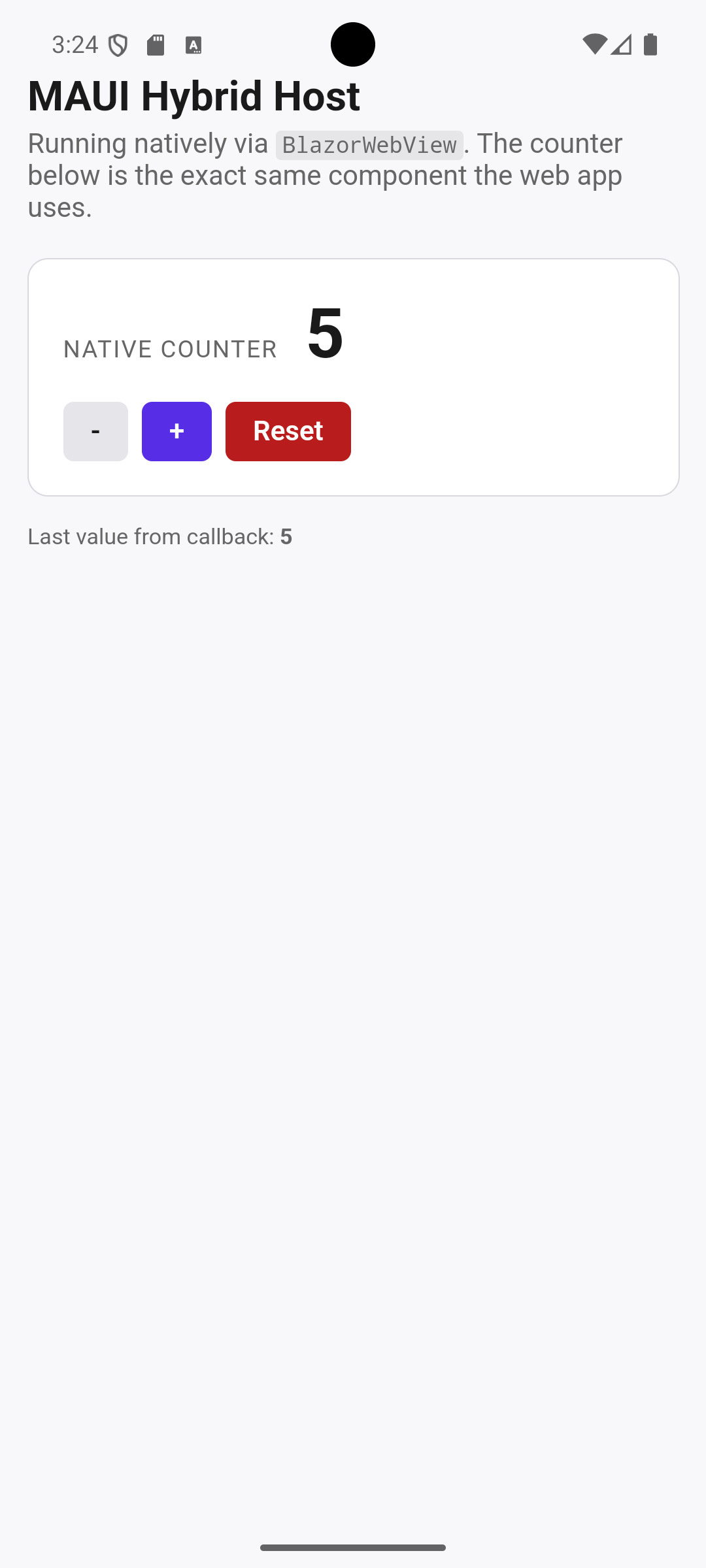 | 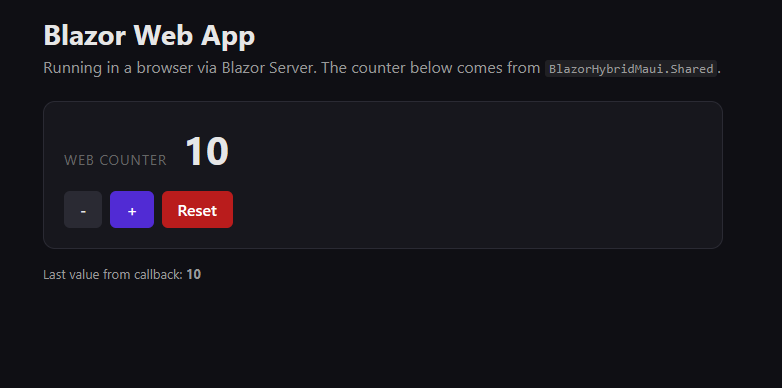 |
In Blazor 10, to use per-component scoped CSS the only is
Dont’ forget use
Is Blazor who append automatically an @import ‘_content/BlazorHybridMaui.Shared/BlazorHybridMaui.Shared.1nltckefah.bundle.scp.css’ in this files