If you’ve been building LLM-powered features with raw HTTP calls to OpenAI, you already know the pain: prompt management scattered across strings, no clean way to let the model call your own C# code, and every “agent” ends up as a giant switch statement. Semantic Kernel is Microsoft’s open-source SDK that fixes that. It gives you a kernel object that owns your model, your plugins (your functions), and the plumbing to let the model call them.
In this post we’ll set up Semantic Kernel in a .NET 10 console app, write a native plugin the model can invoke, and enable automatic function calling.
What is Semantic Kernel?
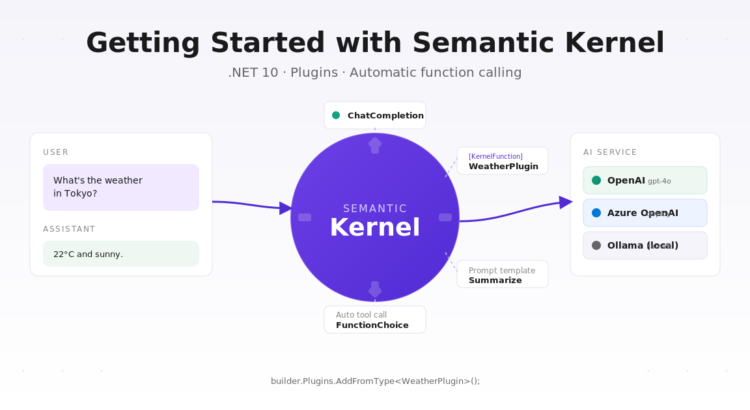
Semantic Kernel (SK) is a lightweight orchestration SDK for LLM apps. Three concepts do most of the work:
- Kernel — the central object. Holds the AI services (chat completion, embeddings) and the collection of plugins.
- Plugin — a group of functions. A function can be a C# method (native function) or a prompt template (prompt function).
- Function calling — when the model decides, mid-conversation, which of your plugin functions to invoke. SK handles the JSON schema, the invocation, and feeding the result back into the model.
Think of the kernel as a small dependency-injection container specifically for AI: services in, plugins in, conversations out.
Setting up the project
Create a console app on .NET 10 and add the NuGet package:
dotnet new console -n SemanticKernelDemo -f net10.0
cd SemanticKernelDemo
dotnet add package Microsoft.SemanticKernel
Set your API key as an environment variable so it doesn’t end up in source control:
# macOS / Linux
export OPENAI_API_KEY="sk-..."

# Windows PowerShell
$env:OPENAI_API_KEY="sk-..."
Building the kernel
The kernel is built through a fluent builder. Register an AI service and any plugins you want available to the model:
using Microsoft.SemanticKernel;
using Microsoft.SemanticKernel.ChatCompletion;
using Microsoft.SemanticKernel.Connectors.OpenAI;

var apiKey = Environment.GetEnvironmentVariable("OPENAI_API_KEY")
    ?? throw new InvalidOperationException("OPENAI_API_KEY not set");

var builder = Kernel.CreateBuilder();
builder.AddOpenAIChatCompletion(modelId: "gpt-4o-mini", apiKey: apiKey);
builder.Plugins.AddFromType<WeatherPlugin>();

Kernel kernel = builder.Build();
That’s it — the kernel now knows how to talk to OpenAI and what functions the model can call.
Writing a native plugin
A native plugin is just a class with methods decorated with [KernelFunction]. SK reads the attributes and the XML/description metadata to produce a JSON schema that the model can reason about.
using System.ComponentModel;
using Microsoft.SemanticKernel;

public class WeatherPlugin
{
    [KernelFunction("get_current_weather")]
    [Description("Gets the current weather for a given city.")]
    public string GetCurrentWeather(
        [Description("The city name, e.g. 'Madrid' or 'Tokyo'.")] string city)
    {
        // In a real app you'd call a weather API here.
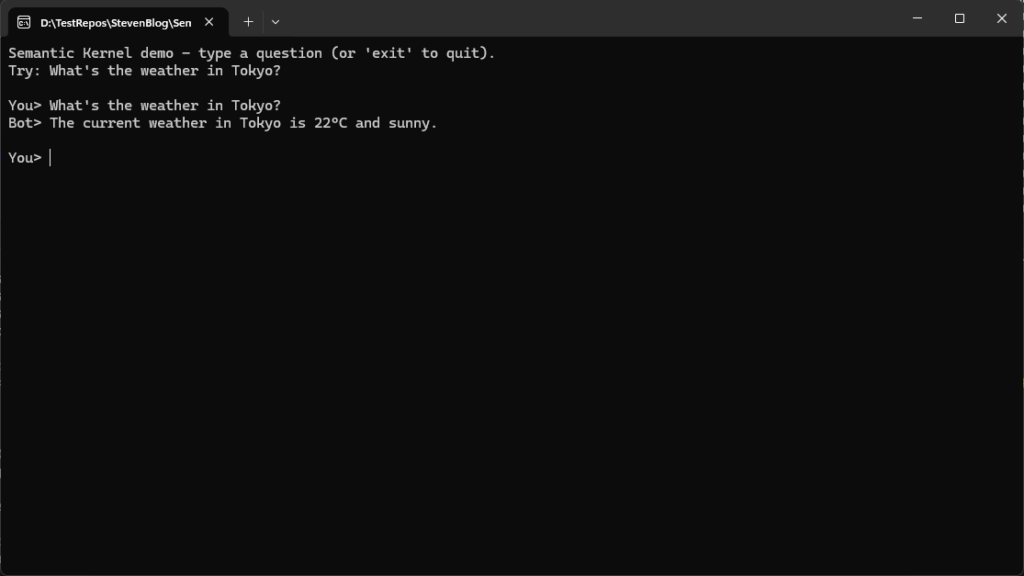
        return $"The current weather in {city} is 22°C and sunny.";
    }
}
Two things to notice: the [Description] attributes on the method and each parameter are not decoration — they are the only hint the model has about when to call this function and what to pass in. Write them like you’d write a good docstring.
Automatic function calling
To let the model decide when to invoke your plugin, pass an OpenAIPromptExecutionSettings with FunctionChoiceBehavior.Auto():
var chat = kernel.GetRequiredService<IChatCompletionService>();

var history = new ChatHistory();
history.AddSystemMessage("You are a concise weather assistant.");
history.AddUserMessage("What's the weather like in Tokyo right now?");

var settings = new OpenAIPromptExecutionSettings
{
    FunctionChoiceBehavior = FunctionChoiceBehavior.Auto()
};

var result = await chat.GetChatMessageContentAsync(history, settings, kernel);
Console.WriteLine(result.Content);
What happens under the hood:
- SK sends the message history plus the JSON schemas for every
[KernelFunction]in the kernel. - The model responds with a “call
get_current_weatherwithcity = "Tokyo"” instruction. - SK invokes your C# method, captures the return value, and sends it back to the model.
- The model produces the final natural-language answer.
You never touched a JSON parser and you didn’t have to write a manual “if the model wants weather, call the weather function” loop. That’s the win.
Prompt functions (a quick taste)
Not every function is C#. You can also register prompt functions — prompt templates that the model can call the same way:
var summarize = kernel.CreateFunctionFromPrompt(
    promptTemplate: "Summarize the following text in one sentence:\n{{$input}}",
    functionName: "Summarize");

var summary = await kernel.InvokeAsync(summarize, new() { ["input"] = longText });
Console.WriteLine(summary);
Mix them: your native functions do deterministic work (call an API, hit a database), your prompt functions do fuzzy work (summarize, rewrite, classify), and the kernel wires them together.
Which provider should I register?
The example above uses OpenAI. Semantic Kernel supports several backends and the switch is one line:
builder.AddOpenAIChatCompletion(...)— OpenAIbuilder.AddAzureOpenAIChatCompletion(...)— Azure OpenAIbuilder.AddOllamaChatCompletion(...)— local models via Ollama (requires theMicrosoft.SemanticKernel.Connectors.Ollamapackage)
The rest of the code — plugins, function calling, chat history — is identical regardless of provider.
Wrapping up
Semantic Kernel earns its keep the moment you want the LLM to do things instead of just generate text. Register a kernel, decorate your methods with [KernelFunction], flip on auto function calling, and you have an assistant that can reach into your codebase.
The full working sample for this post is in the companion repo SemanticKernelDemo — clone it, drop in your API key, and run dotnet run.
Repository
SemanticKernelDemoPreview